
Kanban board
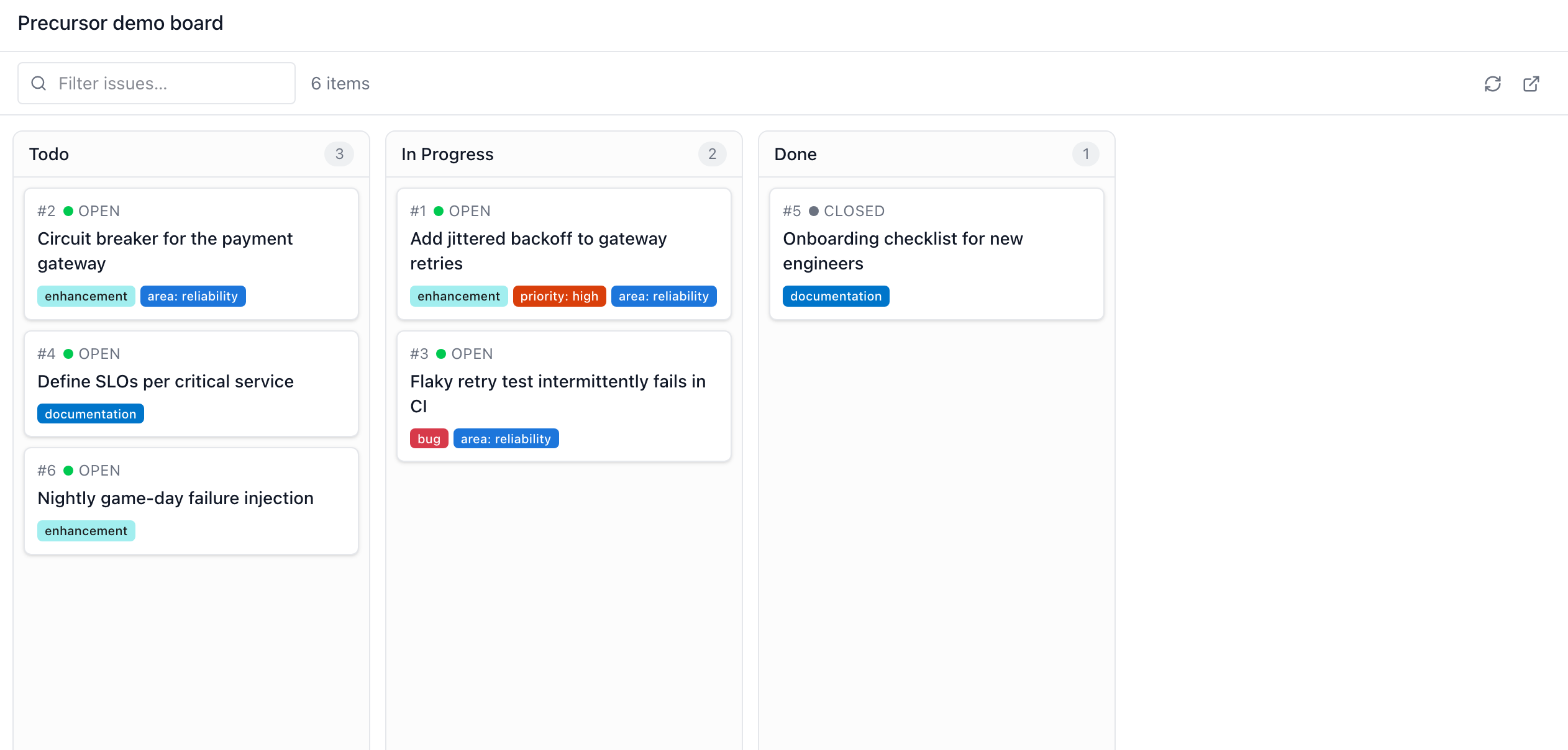
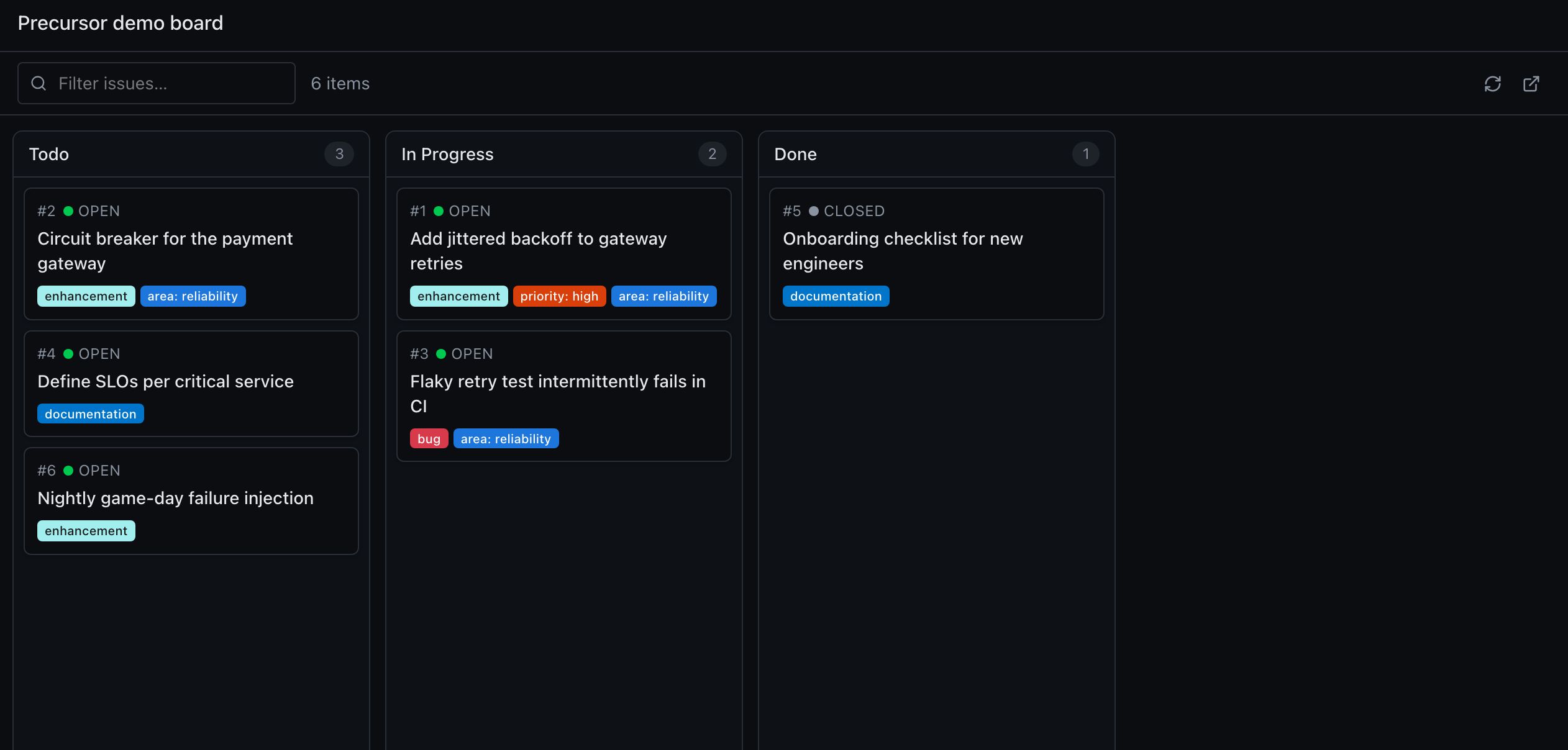
The Kanban section renders a GitHub Projects (v2) board right inside Precursor — a bird's-eye view of your work in flight, grouped into columns you can scan at a glance.
It's a plugin
Kanban is Precursor's first official plugin, and the reference implementation of the plugin contract. It ships from its own repository, precursor-kanban, as its own distribution — carrying its own API routes, schemas, tests, MCP tools and even its compiled frontend, none of which live in core. Install or remove the package and the whole section appears or disappears. It is listed in the plugin catalogue, so Settings → Plugins can install it in a click.
What it shows
Pick one of your GitHub Projects v2 and Precursor draws it as a board:
- Columns are the project's Status single-select field options — e.g. Todo · In Progress · Done — each with a live item count.
- Cards are the project's issues, showing the issue number, its open/closed state, the title, and its labels.
- Filter issues narrows the board as you type.
Managing which boards appear
Everything about which boards you see is managed on the board itself — there is no Kanban page in Settings, because it would only be the same list one navigation further away.
A repository is optional
If a GitHub repository is configured (Settings → GitHub), the picker lists every open project its account owns. That is a convenience, not a requirement: the repository is only ever read for its owner, so it is just another way of saying "list this account's boards".
What the board actually needs is a token with the project scope. An install with no repository at all works fine, driven entirely by the projects you add.
Adding a project
The + next to the Precursor logo opens Add a project:
| You type | You get |
|---|---|
acme-corp | Every open project that account owns |
acme-corp#4 | Just that one project |
https://github.com/orgs/acme-corp/projects/4 | Just that one project |
Additions are de-duplicated, so naming an account you already see changes nothing. Once boards come from more than one account the picker labels each with its owner, which is what tells two projects called "Roadmap" apart.
You need read access to the project, and a token with the project scope.
Removing a project
Right-click any board in the picker:
- Hide from board takes that one board out of the main list. It works on every row, including the ones a configured repository's owner provides — those have no entry behind them, so hiding is the only way to move them aside.
- Stop tracking
<source>drops the entry that added the board. It only appears for boards an entry actually produced. Because a source can be a whole account, the action says how many boards it will take with it and asks for confirmation first.
Hidden and unresolved
Two groups sit below the list, so nothing you have configured can become invisible and unremovable:
- Hidden (N) expands to the boards you have hidden. Right-click → Show on board puts one back. Hiding never stops a source being tracked, so it is always reversible.
- Not resolving lists sources that currently produce no board — renamed, revoked, made private, or an account with no open projects. Right-click → Stop tracking removes the entry.
Moving cards
Change an issue's column straight from the board and Precursor writes the new Status back to the GitHub Project (POST /api/github/projects/{id}/items/{item}/status), so the board stays in sync with GitHub both ways.
Asking about your boards
The plugin also brings its own MCP server, kanban.board, so the assistant can read your boards in a conversation — "what's still in Todo?" — without you leaving the topic. Three read-only tools:
| Tool | What it answers |
|---|---|
list_boards | Which Projects v2 boards exist on the account. |
get_board | Every column and card on one board. |
board_summary | Counts per column, for "where does the work stand?". |
Enable it in Settings → MCP servers, where it appears attributed to the plugin. The tools are deliberately read-only: moving a card is a decision, and the board already makes it a drag.
Previewing a card
Open a card to preview the full issue/PR without leaving Precursor: its title, state, body, labels, and comments. You can edit labels and post a new comment right from the preview.
Enabling the board
The Kanban section is optional: it exists only if its package is installed. It rides along with the kanban extra, which the recommended install already includes:
uv tool install "precursor-ai[kanban]"
# or, into an existing install
uv pip install precursor-kanban
A plain pip install precursor-ai gets a core with no board at all — no sidebar entry, no route, no /api/github/projects endpoints.
Once installed it always appears — as a card on the home launcher, an entry in the sidebar rail, and an entry in the command palette (⌘K / Ctrl-K). It does not hide itself when GitHub isn't set up yet: a plugin you installed and enabled that is nowhere to be seen is indistinguishable from a broken one, so the board explains what is missing instead.
To show anything it needs a GitHub token with access to your Projects (the read:project scope, or a fine-grained token with Projects read). Precursor resolves it from Settings → GitHub or your gh auth login session — see Configuration.
Issue associations (Settings → GitHub) remain the master switch for the whole GitHub surface: turn them off and the board's endpoints answer 403.
Pairs with the scheduler
Combine the board with scheduled topics — e.g. a nightly /gh-sync — to keep issue state fresh without manual polling.