
MCP — tools both ways
Precursor is both an MCP client and an MCP server, with working transports in each direction. Model Context Protocol is the open standard for connecting AI apps to tools and data.
As a client — attaching tool servers
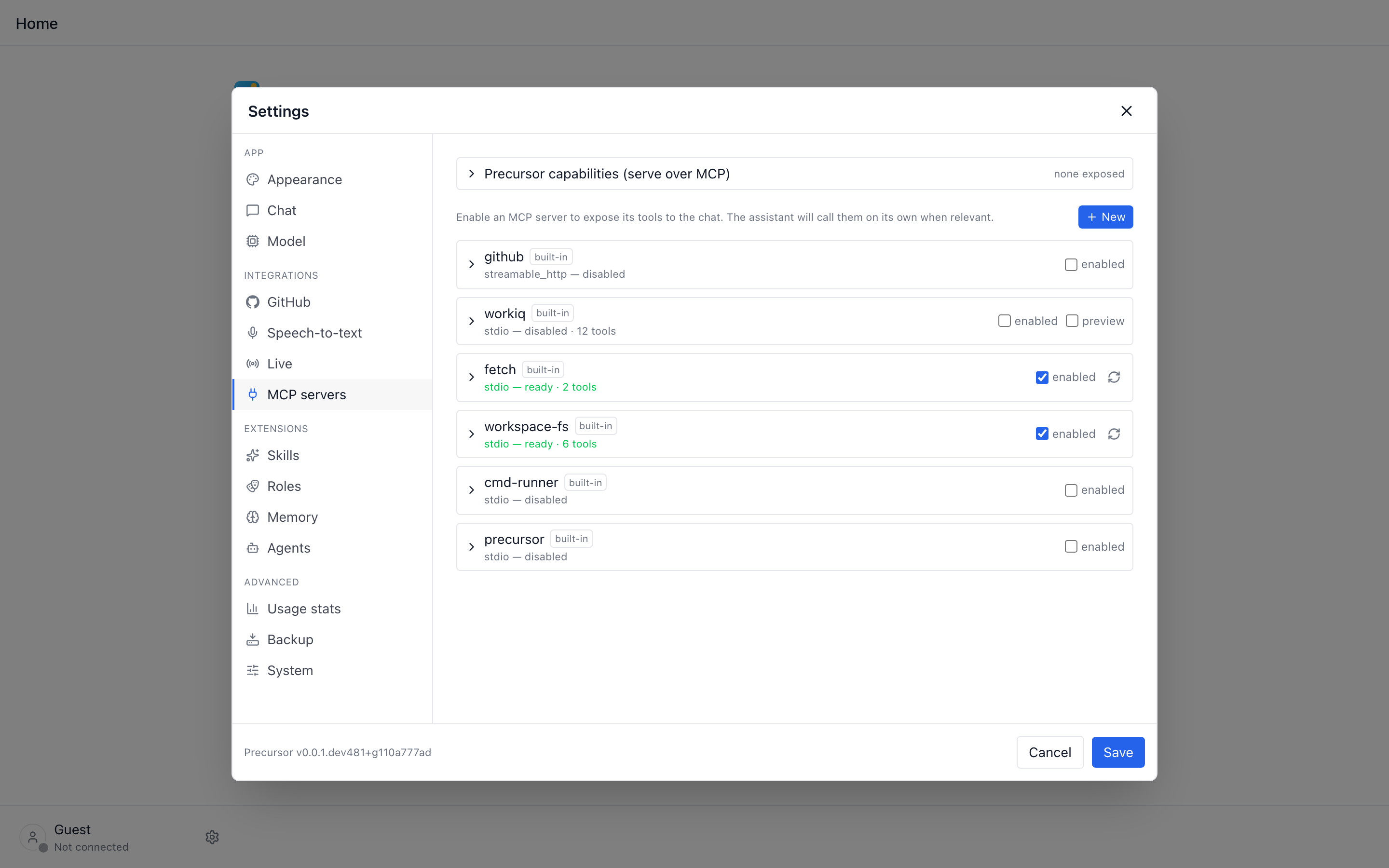
Precursor holds a registry of MCP tool servers. Each is toggled in Settings → MCP; enabled servers are opened per chat turn and their tools are advertised to the model, which can then call them inside the streamed tool loop.
Built-in servers ship in-tree:
| Server | What it does |
|---|---|
github | GitHub issue/PR/repo operations. |
fetch | Fetch and read web content, and make arbitrary HTTP requests. |
playwright | Drive a real Chromium — navigate, read the rendered DOM/text, screenshot. Uses a persistent profile so an interactive sign-in reaches authenticated pages (see below). |
drawio | Author native .drawio diagrams into a workspace, with server-side layout (see below). |
cmd-runner | Run bash / python / node in a Docker jail. |
workiq | Microsoft 365 (mail, calendar, …) — read-only locally, or full read/write via the hosted preview. |
workiq-teams | Microsoft Teams via Agent 365 — chats, channels, messages, presence. |
workiq-user | Directory and people lookups via Agent 365 — profiles, managers, direct reports. |
workiq-planner | Planner via Agent 365 — plans, tasks and goals. |
workiq-word | Word via Agent 365 — create a document, read its content, comment on it. |
workiq-excel | Excel via Agent 365 — create a workbook, read its content, comment on it. |
precursor | Precursor's own data (see below). |
You can also add your own servers (stdio or streamable-HTTP). A host-dependency preflight gates enabling a server — cmd-runner needs Docker when its jail is on, and playwright needs Node.js (npx) on PATH.
Plugins can contribute servers too, such as Kanban's kanban.board. Core maps server/tool pairs to stable model-facing names containing only ASCII letters, digits, underscores and hyphens, capped at 64 characters for compatibility across providers. Names that need conversion receive a hash suffix to distinguish otherwise identical normalized or shortened names. Calls still reach the original MCP server and tool; server IDs and saved enable toggles are unchanged.
Narrow the catalogue per workflow step
Enabling a server here offers it to everything. Tool schemas are re-sent on every turn, so a large registry is a standing context cost. A workflow step can name the handful of servers it may use — the rest are never attached to that step's session.
Startup and the first prompt
A dozen enabled servers used to make the first message of a session the expensive one: nothing connected at startup, so that turn paid connect + initialize + list_tools for every server at once — plus an npx spin-up for the stdio ones — and because they are opened concurrently the slowest set the floor.
Two things remove that cost, both of them invisible:
- The tool catalogue is stored. Each server's tool list is written after a successful connect and restored on the next launch, so Settings renders and the model is offered tools before anything has connected. It stays a hint: the live session is still what a call reaches, and a call that finds a tool the server no longer exposes re-lists the catalogue and retries once rather than reporting a tool that isn't there.
- Enabled servers are warmed in the background. Shortly after startup Precursor connects them one at a time, never blocking startup or any request — several built-ins each launch
npx, and a thundering herd at launch is the very stall being removed. A server whose credential needs an interactive sign-in is skipped, so starting the app never pops a browser window at you.
Both are tunable — see PRECURSOR_MCP_WARMUP_* in the configuration reference.
When a remote server drops mid-turn
A hosted endpoint can go away underneath a live session — a rolling deploy, a gateway blip, or the server simply forgetting the session id it issued. The MCP SDK reports a forgotten session as the single phrase Session terminated, which reads like a local problem and is anything but: it is emitted only when the remote answers with HTTP 404. Other servers say Session not found, and any other HTTP error comes back as the server's own message or an equally vague Server returned an error response, always with the status dropped. Precursor re-attaches it (… (HTTP 502)), because a 404 or 5xx and a 4xx call for different handling.
Left alone that wording is actively harmful. A warm session is reused across turns, so a dropped one stays poisoned and every later call fails the same way; and the model, told only "session terminated", re-plans the call with smaller arguments and then tells you to sign in again — neither of which can fix a fault on the other end.
So Precursor treats a dead session as a transport failure rather than a bad call: a remote 404, any 5xx, or a socket teardown recycles the session and retries the call once, which is enough to ride out a blip. If the second attempt fails too it stops there — a downed endpoint should not be hammered for the rest of the turn — and the model is told what actually happened, that the arguments and the sign-in are not at fault, and to report the outage instead of guessing an answer.
Re-authenticating will not help here
The Re-authenticate button swaps a credential. When the endpoint is returning 404s or 502s the credential is fine, and a fresh token changes nothing — the tool error now says so explicitly.
Playwright — authenticated scraping
playwright wraps Microsoft's official @playwright/mcp to drive a real browser: the model can navigate, read the rendered DOM/text (not raw HTML), and take screenshots. This is what fetch can't do — it does raw HTTP with no browser and no session, so a JS-rendered or login-gated page comes back empty or as a sign-in redirect.
Two things make authenticated endpoints reachable:
- Microsoft Edge is the default channel, so the browser can ride the corporate Edge SSO / WAM broker that signs a managed machine in to Microsoft sites with little or no interaction. Pick another browser in Settings → MCP → Playwright browser (or
PRECURSOR_PLAYWRIGHT_BROWSER) on machines without Edge. - A persistent browser profile. By default Precursor pins nothing, so
@playwright/mcpuses its own shared, machine-wide profile — meaning a sign-in you already onboarded there carries over. The browser opens headed, so the first time a page needs Entra you sign in once and every later turn reuses that session. SetPRECURSOR_PLAYWRIGHT_PROFILE_DIRto pin an isolated profile instead.
Trusted, local use
The persistent profile stores a live authenticated session on disk, and headed sign-in needs a real display. Treat it like the host-mode command runner: a single-user, trusted-machine capability, not something to expose on a shared/headless server.
draw.io — diagrams as files, not pictures
drawio writes native .drawio documents (plain mxGraph XML) into a workspace working tree. Because the output is a file in a git-backed tree, a diagram is reviewable in a git diff and commit-able from the Workspace UI — and it stays editable in draw.io, unlike a rendered image. It is also editable in Precursor, via Workspaces → Editing diagrams.
It shares the workspace sandbox: every path goes through safe_join, so nothing outside workspaces_dir/<slug> is reachable.
| Tool | What it does |
|---|---|
list_workspaces | Find the workspace_id to write into. |
search_shapes | Find real product icons (Azure) and their exact style strings. |
list_shapes | The generic shape / colour / edge presets. |
create_diagram | Build a laid-out diagram from nodes, edges and groups. |
write_diagram_xml | Escape hatch — write raw mxGraph XML (validated, wrapper added). |
read_diagram | Read a diagram back to edit and rewrite it. |
Two things exist here because a model left to itself gets them wrong.
Real icons, not blank boxes. draw.io's Azure library is a set of SVG images, not mxgraph.azure2.* stencils. Models reliably invent the stencil form, draw.io can't resolve it, and every service degrades to a featureless rectangle. So Precursor ships a catalogue of ~700 verified Azure shapes and serves it through search_shapes; create_diagram also resolves free text ("azure firewall") and reports what it matched, so an unresolved shape is something you get told about rather than discover in the rendered file.
Colours are for boxes, not icons
color tints plain shapes. It's ignored for catalogue icons — painting a fill over an SVG icon is precisely what flattens it into a coloured square.
Layout, including nested containers. Models write plausible mxGraph but pick poor coordinates, so shapes overlap and edges cross. Describe the graph instead — nodes, edges and groups — and the server derives the geometry. groups nest freely via their own group field, which is what makes real cloud topologies expressible (region → VNet → subnet → resource) without dropping to raw XML:
create_diagram(
  workspace_id = 1,
  path         = "docs/hub-spoke",            # .drawio is appended for you
  direction    = "horizontal",
  groups       = [{"id": "hub",   "label": "Hub VNet — 10.0.0.0/16", "color": "blue"},
                  {"id": "fwsub", "label": "AzureFirewallSubnet",    "group": "hub"},
                  {"id": "spoke", "label": "Spoke 1 — Production",   "color": "green"}],
  nodes        = [{"id": "fw",  "label": "Azure Firewall", "shape": "networking/firewalls", "group": "fwsub"},
                  {"id": "app", "label": "App Tier",       "shape": "compute/vm-scale-sets", "group": "spoke"}],
  edges        = [{"source": "fw", "target": "spoke", "label": "VNet peering"}],
)
Any field that takes a preset also accepts a raw mxGraph style, so the rest of the draw.io catalogue — AWS, UML, BPMN — stays reachable. Output is deterministic, so regenerating an unchanged diagram produces an empty git diff. Existing files are never clobbered unless you pass overwrite=true.
Signing in to WorkIQ and Agent 365
workiq has a preview toggle: off, it runs the local stdio launcher (read-only ask); on, it switches to the hosted, OAuth-protected HTTP endpoint for the full read and write surface. Sign-in is a browser flow, and when one is needed an inline banner surfaces it right in the app.
The prompt waits for the tool that needs it. A turn is never held up because some other server's credential has gone stale — with three Entra credentials in play, one expired WorkIQ token used to stall a question that had nothing to do with WorkIQ, for up to five minutes, before a single word was generated. Now the turn starts immediately and the sign-in is asked for only if the model actually reaches for a tool on the affected server, naming that tool when it does.
That is not the same as hiding the tools. A blocked server still contributes its tools to what the model is offered, from the stored catalogue, because quietly removing them is what makes a model answer from memory instead of calling the tool. If the sign-in doesn't happen, the call comes back as an explicit error telling the model it could not reach the tool — never as a confident guess.
Precursor is built to keep those credentials alive without interrupting you: tokens are refreshed silently before they expire, a lapsed credential is renewed hands-free where the browser still holds a live session, and when several servers go stale at once you get one prompt, not one per credential. The banner is the last resort, not the first move.
Entra's sign-in is taken as Entra serves it. Both endpoints point at Entra's multi-tenant organizations authority, which publishes a templated issuer (…/{tenantid}/v2.0) because the real one depends on whose account signs in. The MCP SDK's strict issuer check would reject that outright, so Precursor accepts exactly that template for exactly those authorities, and a concrete tenant issuer on the redirect in its place. It also drops the prompt=consent the SDK adds whenever it asks for a refresh token: Entra issues one without it, and forcing it would put a consent screen in front of every sign-in, defeat the silent pass, and stop users whose tenant reserves consent for admins.
A sign-in counts for every server on that credential. Several built-ins share one Entra token — the five Agent 365 endpoints are a single sign-in between them — so when one completes, the rest are re-pointed at the fresh token and reconnected on the spot instead of being left showing a sign-in they already have. Settings → MCP matches that: the button belongs to the credential, so the servers sharing it read signs in with WorkIQ Teams rather than offering a redundant prompt of their own.
Idle credentials are allowed to go quiet — a server you enabled months ago and never call stops being refreshed, and stops nagging — but a genuine lapse is surfaced proactively rather than discovered as a stalled request.
Precursor restores each stored token's real expiry when it loads the credential, so the SDK's own silent-refresh path actually runs. Before that, a token read from disk looked indefinitely fresh, the refresh branch was never entered, and every expiry escalated to a full browser sign-in — the refresh token was dead weight. Interactive sign-in is now the exception rather than the routine.
It also resolves the authorization server before that refresh is built. The SDK discovers it only while handling a 401, which is after the refresh it attempts first, so a background renewal would otherwise fall back to guessing the token endpoint from the MCP URL and post the grant at the WorkIQ/Agent 365 host instead of Entra. Those hosts have no token endpoint, the SDK read the resulting 404 as a refusal, and a renewable credential was thrown away in favour of a browser prompt — the two halves of the same bug, so fixing the expiry alone was not enough.
And when it does decide a token is due, it says so to the SDK. The refresh branch is gated on the SDK's own freshness check, which was happy with a token that still had a few minutes left — so the keep-alive opened a session intending to renew, nothing happened, and the untouched token came back looking renewed. Renewal only really occurred in the last seconds of a token's life, which is a tick's delay away from the interactive prompt this all exists to avoid. The deliberate-renewal path now marks the credential spent, so the refresh it asked for is the refresh it gets, and a renewal that changed nothing is reported as the anomaly it is rather than logged as a success.
How far ahead of expiry that happens isn't a setting. It follows from the token's own lifetime — a quarter of it, never less than five minutes — because the only thing that matters is how many attempts fit before the token dies. A typical Entra token lands around 17-22 minutes of runway, so a failed or delayed tick has a dozen more chances rather than one.
Sign-ins that were stored before this
A token saved without a refresh token can't gain one retroactively, so Precursor raises the ordinary sign-in banner once instead of attempting a renewal that cannot succeed. You sign in one more time and come back with a renewable credential.
Every part of this is tunable; see the PRECURSOR_WORKIQ_* entries in the configuration reference to disable automatic re-auth, change how often the keep-alive polls, or restore stricter behaviour. If a prompt ever appears you can't explain, the browser console carries a [workiq-auth] trace of each step of the sign-in with timings.
When a sign-in prompt needs explaining
The console trace above is only the SPA's half of the story — the legs it observes. It can tell you the silent frame never completed; it cannot tell you that Entra answered AADSTS700082: The refresh token has expired due to inactivity. That answer arrives at the backend, and until now nothing recorded it: the MCP SDK logs a bare Token refresh failed: 400 naming neither the credential nor the reason.
So the backend keeps its own trace, on a dedicated logger. Every decision taken about a WorkIQ credential reports to precursor.mcp.auth, prefixed [workiq-auth] and stamped with an episode id that stitches a keep-alive verdict, a hands-free pass and a manual click into one story:
2026-08-24T09:11:02Z INFO precursor.mcp.auth [workiq-auth] [wq-3f2a1c] workiq +0ms — episode opened reason='keep-alive could not renew silently'
2026-08-24T09:11:02Z WARN precursor.mcp.auth [workiq-auth] [wq-3f2a1c] workiq +38ms — silent refresh REFUSED by Entra error='invalid_grant' error_description='AADSTS700082: …'
2026-08-24T09:11:03Z INFO precursor.mcp.auth [workiq-auth] [wq-3f2a1c] workiq +1204ms — leg ① starting: silent prompt=none authorization
2026-08-24T09:11:23Z INFO precursor.mcp.auth [workiq-auth] [wq-3f2a1c] workiq +21208ms — loopback timed out — no redirect ever arrived
That channel has its own level, workiq_auth_log_level, independent of the app-wide log_level. It defaults to debug on purpose: a lapse is rare and only happens in the wild, so the trace has to already be running when it does. The channel is silent outside an auth episode, so it costs nothing the rest of the time — raise it to info for transitions only, or warning to quieten it.
Terminals scroll, though, and a packaged app has none. So the same records are kept in memory and served, with the state that explains them, by GET /api/mcp/auth/diagnostics: the settings in force, then per credential — whether a token is stored, whether it has a refresh token at all, when it expires, how far ahead of that it will be renewed, how long it's been idle, and whether connects are being fast-failed.
In the SPA, one console call collects both halves and puts them on your clipboard, ready to paste into an issue:
await precursorWorkiqAuthReport()(If it reports it couldn't reach the clipboard, DevTools had focus rather than the page — the JSON is printed instead, or use copy(await precursorWorkiqAuthReport()).) Token values never leave the process; secrets and account names are reduced to <present:N chars>, and the ~37-entry Agent 365 scope list is summarized to a count plus whether offline_access is in it.
Episode records are buffered apart from the keep-alive's ambient heartbeat, so a credential that lapsed overnight still explains itself the next morning rather than having been pushed out by a thousand once-a-minute "nothing to do" ticks — and the ticker itself only reports a verdict when it changes.
A failed automatic attempt no longer costs you the credential
The hands-free passes clear the stored token before they run, so the SDK is forced through a fresh grant instead of short-circuiting on a token it still considers valid. If the pass then failed, that credential was simply gone — and since the verdict that triggers a pass can come from a transient 401, a refresh token that would have worked perfectly well on the next try was being thrown away, turning a blip into a mandatory sign-in. The old credential is now put back whenever a hands-free pass doesn't complete, at a cost of at most one doomed refresh later. An explicit Sign in still clears outright — you're right there, and a stale token must not shadow the new grant.
Agent 365: the hosted workiq-* servers
Microsoft's Agent 365 platform exposes more hosted MCP endpoints, and Precursor ships the five that one sign-in reaches:
| Server | Covers |
|---|---|
workiq-teams | Teams: list/send chat and channel messages, members, presence, files. |
workiq-user | Directory: your profile, other users, managers, direct reports. |
workiq-planner | Planner: create and query plans, tasks and goals. |
workiq-word | Word: create a document, read its content, add and reply to comments. |
workiq-excel | Excel: create a workbook, read its content, add and reply to comments. |
One sign-in covers all five. They authenticate as the same Entra client against the same resource, so Precursor caches a single Agent 365 credential — sign in from any of them and the other four are re-pointed at that token and reconnected immediately, with no second prompt. In Settings → MCP only the first of them carries a sign-in button; the rest read signs in with WorkIQ Teams. The WorkIQ preview is a different client and resource, so it keeps its own token; signing in to Teams never disturbs it.
Why not workiq-productivity (or -mail, -files, -sharepoint)?
Agent 365 hosts those too, but they sit behind a second Entra resource — the shared credential is rejected there with invalid_audience, so each would cost another consent and another sign-in. Their ground is already covered by the hosted workiq preview server, which reaches mail, calendar and files through Graph paths on the credential you have.
Note also that Microsoft's workiq-productivity plugin is a different kind of thing entirely: a bundle of read-only prompt skills that drive the workiq tools you already have — not a server to add here.
They need your Microsoft tenant. The endpoint URL embeds a tenant GUID, and Entra rejects the common / organizations aliases there. Precursor resolves one in order: Settings → MCP → "Microsoft 365 tenant", then PRECURSOR_WORKIQ_TENANT_ID, then auto-discovery from a token you already hold via a hosted WorkIQ sign-in. In practice, if you've signed in to the WorkIQ preview the servers configure themselves with nothing to fill in. Until a tenant is known the entries stay unconfigured and say so.
Approving tool calls
Whether an attached tool runs on its own is governed by the conversation's tool approval policy. Under balanced, a tool runs without asking only when its server marks it read-only (the MCP readOnlyHint annotation); a tool that says nothing is treated as a change and waits for you.
As a server — exposing your conversations
Precursor runs an MCP server (the SDK's MCPServer) named precursor that exposes its own data to MCP hosts (VS Code, CLI agents): topics, messages, chats, agents, live (meeting) sessions, cross-entity search, Precursor IQ retrieval and cited answers, skills, memory, agent state, workflow state, append_note, post_message, side chats, schedules, reminders, workspaces, and a few basic tools.
Basic tools is a section of small stateless helpers that read none of your data, so a model stops guessing at things it is bad at. Like every section it is off by default.
| Tool | What it does |
|---|---|
get_datetime | Current date, time, weekday, ISO week and UTC offset, in this machine's zone or any IANA timezone. |
convert_timezone | Convert an ISO 8601 date-time between IANA zones. |
date_math | Shift a date by years/months/weeks/days/hours/minutes, or measure the gap between two dates (including business days). |
calculate | Evaluate arithmetic and common math functions (sqrt, log, round, …) without running arbitrary code. |
convert_units | Length, mass, volume, time, data size, speed and temperature. |
generate_uuid | UUID v4 (random) or v7 (time-ordered), up to 100 at a time. |
random_value | Cryptographically secure URL-safe or hex tokens, and integers in a range. |
hash_or_encode | MD5/SHA hashes and base64, URL, hex and HTML encode/decode. |
count_text | Characters, words, lines, sentences, paragraphs and an estimated token count. |
get_system_info | App version, OS, architecture, Python, locale and time zone. Never host or user names, paths or environment variables. |
Workspaces are part of this server. The standalone workspace-fs server was folded in. The Workspaces section serves list_workspaces, list_workspace_files and read_workspace_file; Edit workspaces adds create_workspace (an empty local workspace, or a git clone from a repository URL), create_workspace_file, write_workspace_file and create_workspace_folder. Both sections are opt-in even for Precursor's own agents, and an agent still gets a permission prompt before each write. An existing workspace-fs enablement is migrated automatically on upgrade (and a workspace-fs agent scope now resolves to precursor).
In Settings → MCP → Precursor capabilities, Select all and Unselect all flip every section at once.
append_note and post_message are deliberately different tools. append_note persists the text you hand it and returns — the right call for filing an already-written briefing into a topic. post_message spends a whole generation replying to it, which is what you want for a question and pure overhead for a note.
Both name the topic they wrote to. Their result carries a topic object with the title, the slug path and the in-app URL, not just the numeric topic_id — which is an internal detail the app never shows you, so "filed under topic 42" was impossible to check. You get customers/sanofi/avm-alz and a link you can open, which makes a note filed under the wrong topic obvious immediately.
A write from the server shows up live. The precursor server runs as a stdio subprocess: it shares the app's database but not its in-memory event bus, so a note filed through it used to land in the database while every open window kept rendering the topic as it was, until someone reloaded. Child processes are now handed a loopback relay URL plus a per-run token and forward their events to the app, which republishes them to every window — including the one whose chat turn called the tool. Only data-refresh event types are accepted, and only with the token, so the relay can never do more than make a window refetch what it is already entitled to.
That covers every server Precursor launches itself, which includes the built-in precursor entry and the one an agent is given. An external host that launches python -m …precursor_server on its own gets no token and so relays nothing; point it at the HTTP endpoint below instead, which runs inside the app process and therefore updates the UI directly.
Search spans every surface, using the same substring lookup the ⌘K palette falls back to, so a host can find a topic, chat, agent task or meeting by content and then follow the hit's accessor hint (get_chat, get_agent, …) to read the full record. Chat, agent and live hits only appear when their own section is exposed, since their snippets disclose that content.
Precursor IQ adds ranked, cited retrieval. retrieve returns the passages most relevant to a natural-language query, plus a grounding Markdown block that numbers them as [^n] citations, WorkIQ-style. ask has Precursor's model write a cited answer from those passages. Each has its own toggle (iq, iq_ask), and every hit is also gated by its source's section, so IQ never returns more than the per-section tools would.
Side chats. create_side_chat starts a chat linked to a topic, optionally from one of its replies (message_id) or an excerpt of it (quote). It generates nothing: the chat is created empty for the user, and the result carries its in-app URL. It has its own write toggle, side_chats. get_topic lists the topic's side chats only when chats is exposed too, since their titles disclose chat content.
Topics come back with their tree position resolved. Every topic payload carries a path — the ancestor slugs joined root-first with / — so a caller never has to walk parent_id upward with a chain of get_topic round trips.
Every tool is gated by a per-section mcp_expose toggle — off by default, because exposing conversation history outbound is opt-in. The server only advertises the tools of exposed sections (with nothing exposed, just precursor_info), so the tool count on the precursor card in Settings follows the toggles; saving them reloads that server's tool list.
Two transports serve the same tools:
- stdio —
python -m precursor.backend.services.mcp.precursor_server; how a host launches it as a subprocess. - HTTP — mounted in-process at
/mcp(streamable-http). Off by default, loopback-only, with a Host-header allowlist (DNS-rebinding protection) and no auth — so it never answers on a non-loopback bind.
Keep MCP-over-HTTP local
The HTTP transport has no authentication and only binds to loopback. Leave it that way unless you front it with your own authenticating proxy.
See the architecture reference for the full picture of both directions.