
Skills, roles & memory
Three complementary ways to give the assistant standing context: skills are reusable prompt presets you invoke on demand, roles are named personas a conversation adopts, and memory is long-term notes injected into every conversation automatically.
Which one do I want?
| You want… | Use |
|---|---|
| An instruction you invoke on demand | a skill (/pr-review) |
| One chat that always applies the same instruction | a chat description referencing a skill |
| A reusable persona across many conversations | an assistant role (/role <name>) |
| A fact applied to every conversation | memory |
Skills
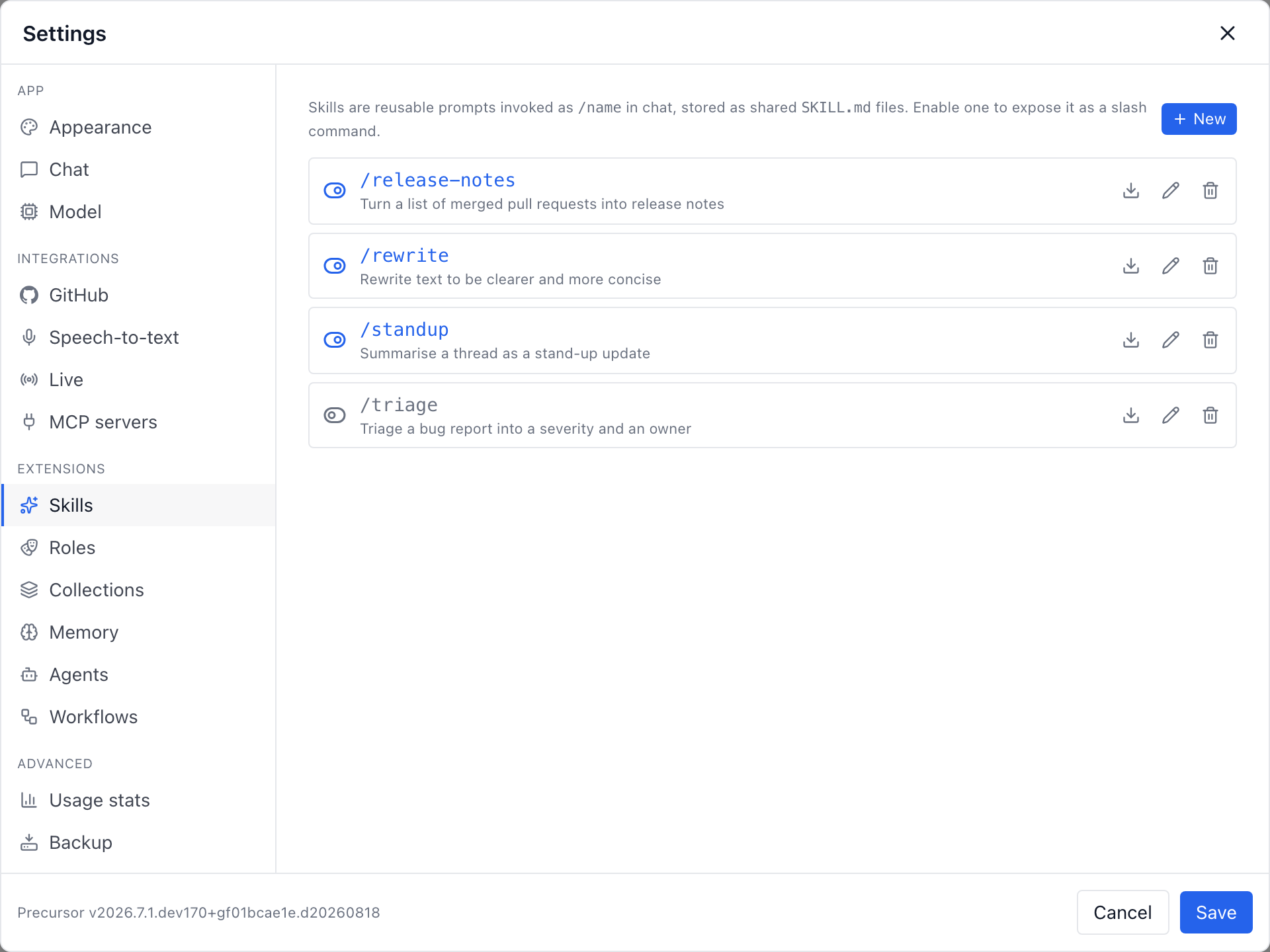
A skill is a reusable prompt preset invoked as /name in chat. Skills are stored as SKILL.md files using the GitHub Copilot CLI's format (YAML frontmatter with name / description, plus a markdown body of instructions), so they're interoperable across tools.
---
name: pr-review
description: Review a pull request diff for correctness and style
---

You are reviewing a pull request. Focus on correctness, edge cases, and
adherence to the project's conventions. Be concise and cite line numbers.
Invoking a skill
A skill at the start of a message is the classic invocation: everything after it is the argument, and the transcript keeps showing the literal command while the model receives the instructions followed by your text.
/pr-review here is the diff …You can also reference a skill anywhere inside a message. There the /name token is substituted in place, so the sentence still reads as one instruction:
Take the notes below, /rewrite them, then summarise in three bullets.Only active skills expand, and a reference is recognised only at the start of a line or after whitespace — so paths (/usr/bin), URLs and prose (and/or) are never mistaken for a skill call.
Skills that call skills
A skill's own body may reference another skill. Expansion is capped at two levels and a cycle (/a → /b → /a) stops rather than recursing.
Where they live
The skills folder is resolved the way the CLI resolves its home: COPILOT_HOME → XDG_CONFIG_HOME/copilot → ~/.copilot, with a PRECURSOR_SKILLS_DIR override. Files live at <copilot_home>/skills/<name>/SKILL.md.
A discovered skill is disabled until you opt in, so skills authored by other tools show up in the Skills tab without silently becoming active. Enable, edit, export, and delete all operate on the file itself.
Standing skills: triggering one from a chat description
A chat description can reference a skill too, which turns a chat into a dedicated, single-purpose surface — no slash command to type, ever. Set the description to something like:
For every message I send: /rewrite…and tick Use as system prompt in the chat's settings. The skill's body is re-asserted as a mandatory instruction on every user turn, so each message you paste is rewritten without any command. It works in the default context mode too, where the expanded description rides along as standing context instead of being enforced per turn.
Assistant roles
A role is a named, reusable persona — a system prompt injected into every turn of whatever adopts it. Where a skill is a one-shot instruction you invoke, a role is persistent: assign it once and it re-applies until you change it.
Roles are managed in Settings → Roles. Every install seeds one built-in default role whose prompt is empty — so out of the box a role injects nothing. It can be edited but not renamed or deleted, which guarantees every discussion always has a fallback.
Conversations refer to a role by its name, so a role can't be renamed — create a new one to use another name. Deleting a role reverts whatever used it to the default. With definition files in files mode, each role is a roles/<name>.role.yaml file and this tab edits it. Deleting also clears that name from agent and workflow definition files, so reloading or restarting cannot restore the old assignment. Other file settings and pending permission reviews are kept. A running workflow's saved version loses only the deleted role; its pinned steps stay unchanged.
If an agent or workflow definition cannot be checked safely, or an affected file has a duplicate id, changes during deletion, or cannot be written, deletion reports a conflict and keeps the role. Resolve the reported file problem and try again.
Until you migrate, the tab shows where to start: a note linking to Settings → Definition files.
Picking a role where you type
The role picker sits in the composer toolbar, next to the model controls, on every surface that has one: a topic, a chat (including one opened beside a workspace), an agent task, and the Start a new chat / Start an agent task screens. The Start a new chat composer also offers your /skills. Live sessions have no composer, so their picker sits in the capture toolbar beside the meeting language.
What it means depends on where you are:
- On the creation surfaces it chooses the role the new chat or agent task is born with, so the persona is in place for the very first turn.
- On an existing conversation it reassigns that conversation's role, and the change is saved to the conversation itself — it is not a one-off override for the next message. Reload the page and the new role is still there.
The /role <name> command does exactly the same thing from the keyboard — on a topic, a chat and an agent session — and a bare /role opens that surface's picker so you can browse what's available. Live sessions have no composer to type it in, so they use the toolbar picker only.
The same role can be adopted by a topic, a chat, a workspace, an agent, a Live session, and a workflow — all resolved through one code path, so a role behaves identically everywhere. A collection can nominate a default role that new topics inside it start from.
A role expands skill references the same way a chat description does, so a role prompt like "For every reply: /role-skill" follows you across every surface.
Memory
Memory is long-term notes injected into the system prompt of topic chats, flat chats, and agent sessions — so standing preferences and facts follow you everywhere. Use it for something you want applied automatically ("Always answer in French", "Our default branch is main").
Manage memory three ways:
- From Settings — edit the list directly.
- From chat — slash commands:
/memory-store [kind] <content>— record a note./memory-list— list notes with their ids (needed for updates)./memory-update <id> [kind] <content>— refine an existing note.
- By the model itself — via the built-in
precursorMCP server toolsstore_memory,update_memory(gated by amemory_writetoggle), and the read-onlylist_memories.